
高级FTP帐户密码恢复
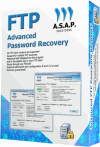 您是否曾经遇到过遗忘密码的问题? 意外 “输入密码” 窗口提示连接到服务器所需的秘密字符组合. 您已将密码存储在FTP客户端软件中, 但是无法查看,因为它被星号隐藏 (*****) 更糟糕的是,如果您不记得这种组合. 高级FTP密码恢复工具旨在帮助您解决该问题. 使用此工具,您始终恢复存储的FTP密码.


When you login to the FTP server, your FTP client has to submit login information (including the password) to the server. Advanced FTP Password Recovery tool emulates the FTP server and intercept the login and password information and display it.
Recovered password is displayed in program list and also in FTP client session. It is a useful and universal password recovery tool for FTP accounts. 高级FTP密码恢复可以恢复所有FTP客户端的密码, FTP Voyager, 总指挥官, 可爱的ftp, aceftp, Coffeecup ftp, 核心FTP, Securefx, WS_FTP, filezilla, flashfxp, 核心FTP, FTP Explorer, ftprush, 网站出版商, 防弹FTP, 光, WSFTTP, FTP导航器 (FTP指挥官的旧名称) FTP Express和其他. 恢复这些软件的密码, 您可以使用FTP客户端之一, 保存密码, 并连接到高级FTP密码恢复, 然后将显示从FTP客户端程序中收到的密码. The program can only recover the passwords that are stored by FTP client.
高级FTP密码恢复, the key features
- All FTP clients support
- Running under Windows 95, 98, 我, 2000, XP, 2003, Vista
- Shows passwords hidden under asterisks under FTP client session
- Stores recovered passwords in a list where you can specify the host name of FTP server
- Full FTP server emulation on specified port
- Multiple login / password recovery support
- Saves reports to a file
Universal FTP Password Recovery tool was tested and known as
WS FTP password decrypter, CuteFTP password recovery tool, FileZilla FTP password cracker, Bulletproof FTP password interceptor, FTP Explorer password decoder, Core FTP password sniffer, FTP Voyager password ripper, FTP Commander account hacker, CoffeeCup FTP password finder, it was tested with TurboFTP, FFFTP, FTPExplorer, FreeGate, UltraFXP, ftprush, Securefx, BulletProof, FTP Express, FAR Manager, Windows Commander, 总指挥官, Website Publisher FTP clients and can be used to recover passwords for other clients software.
Advanced FTP Password Recovery screenshots
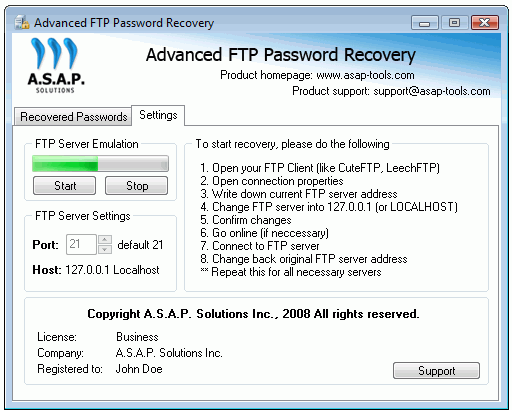
Settings tab contains the main settings, start/stop controls and startup instructions.
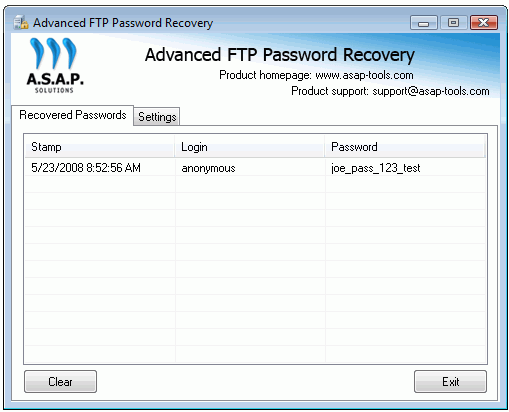
Recovered Passwords tab – displaying recovered Login and Password for FTP connection. There is also the time stamp available which you can fill with another information.
你喜欢这个帖子吗? 为什么不 在下面发表评论 并继续对话, 或者 订阅我的提要 并将类似的文章自动发送给您的饲料阅读器.
评论
还没有评论.
对不起, 评论表格目前已关闭.