
SmartFTP连接密码恢复
Advanced FTP Password Recovery for SmartFTP – Solution for easy recovering the FTP passwords of SmartFTP.
How to make the SmartFTP password recovery?
How to recover FTP password of SmartFTP (by SmartSoft Ltd.)?
FTP Options of SmartFTP
1. Run SmartFTP client software
2. 选择密码恢复的FTP连接 (ftp.microsoft.com for example)

3. 写下当前主机名和端口设置. You should restore them after recovery
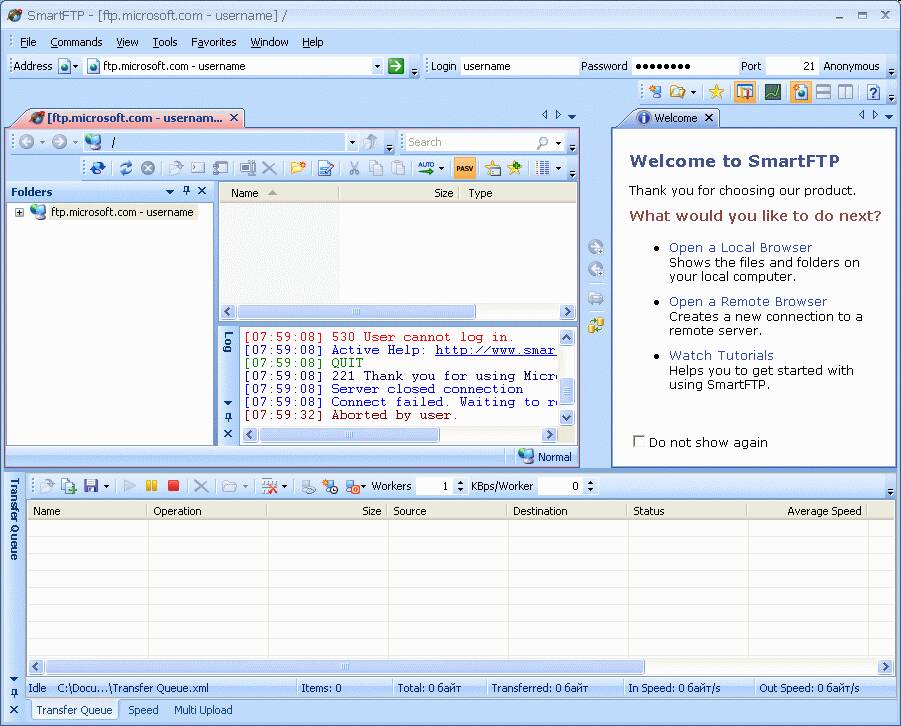
4. Type in LOCALHOST to the Address field. * 您也可以输入 127.0.0.1 or current IP address of the computer where the Advanced FTP Password Recovery will be started.

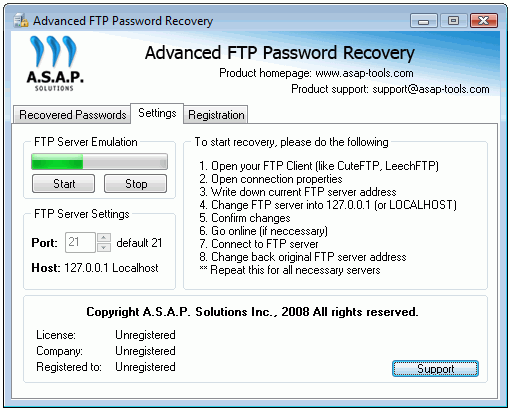
5. Run the Advanced FTP Password Recovery tool and launch the FTP server emulation by pressing Start button on the Settings tab.
绿色指示器将向您显示服务器仿真已启动.
* You should change the port value also in case if the SmartFTP port settings are not default (21)
6. Go to the SmartFTP tool and start the FTP connection selected in step #2
To do it – you should press GO button 
7. After connection you will get the recovered password displayed in Advanced FTP Password Recovery special tab named as Recovered Passwords:
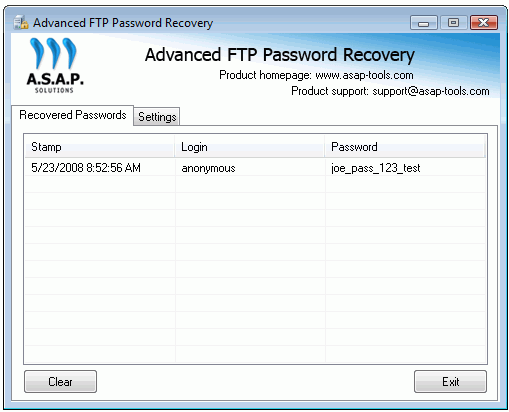
Now you can write down the recovered password and change the Address (and port if applicable) to original values (请参阅步骤 #4)