
전망 전송
 당신이 원한다면 이메일 전송 (EML 또는 MSG) 한 프로그램에서 다른 프로그램으로 이동하거나 Thunderbird에서 Outlook으로 내보낸 이메일을 읽거나 보관된 .eml 메시지를 Outlook으로 이동하거나 보관된 .msg 메시지를 Outlook으로 변환, 그런 다음 필요한 것만으로 Outlook Converter. Outlook Converter를 성공적으로 사용할 수 있습니다. 별도의 eml 파일을 MS Outlook으로 이동 Office Recovery 및 기타 소프트웨어를 사용하여 이메일을 복구한 후 생성됩니다..


Outlook Transfer is an application which allows users to import the amount of .eml and .msg files into Outlook fast and easy. If you have Outlook and wish to import a bunch of emails saved by another email software, then Outlook Transfer (Converter) is what you need.
E-mail converting, transferring utility (eml2pst, msg2pst)
전망 전송 (Converter) can move separate EML and MSG files to the newly created or selected Outlook Folder, the converter provides an easy way to browse and choose files to be moved to Outlook Personal Folder (PST).
이 도구는 기본 무결성 검사를위한 내장 모듈이있는 EML2PST 및 MSG2PST 변환기로 작동합니다.. 이 도구는 메시지뿐만 아니라 첨부 된 파일도 가져올 수 있습니다.. 안정적인 알고리즘은 가져 오기 동안 데이터 손실이 불가능합니다.
To exclude the duplicated messages the import module creates a new subfolder for each importing session with the timestamp. So each time you run the Outlook Transfer-Converter you can be sure that it doesn’t accidentally overwrite any messages of previous session. 특수 EML 및 MSG 읽기 모듈은 .eml을 읽을 수있는 사용하기 쉬운 기능을 제공합니다. (RFC822의 기본 Outlook Express 형식) 및 .msg (MS Office Outlook 메시지) Microsoft Office 패키지에 포함 된 Microsoft Outlook Mail 클라이언트 직접.
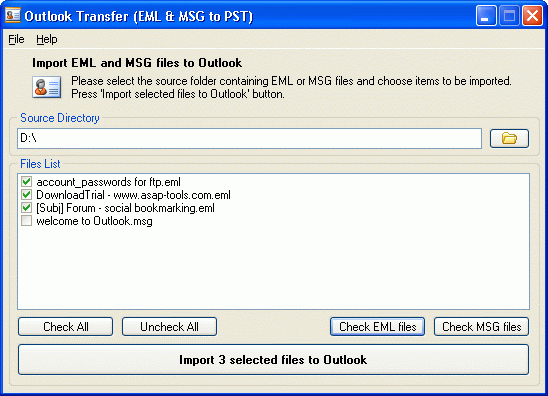
The main window of Outlook Transfer allows users to choose the source folder in order to choose and transfer the EML and MSG files.
이메일을 전송하려는 경우 (EML 또는 MSG) 한 프로그램에서 다른 프로그램으로 또는 Thunderbird에서 EML로 내보내려있는 이메일을 Outlook로 내보내거나 EML 파일을 Outlook으로 읽거나 아카이브 된 .ml 메시지를 Outlook으로 이동 시키거나 보관 된 .msg 메시지를 Outlook으로 변환하려는 이메일을 읽으십시오., 그런 다음 필요한 것만으로 Outlook Converter. The Outlook Converter can be successfully used to move separate eml files to MS Outlook which are created after email recovery with Office Recovery and other software.
Outlook Transfer Utility Key Features
- Reads .eml and .msg files and Allows Microsoft Office Outlook to import them
- Converts eml to pst or msg to pst (moves to MS Outlook)
- Creates a new subfolder for each importing session
- Imports messages to the password protected PST file (Outlook Personal Storage)
- The eml. and msg. converter is compatible with Windows 98, 나, NT 4.0, 2000, xp, 창 2003
- Tool is support Outlook 98, 2000, 2002, 2003 그리고 2007
- Allows easily Import Archived email messages saved by other programs (not compacted by OE)
- Works with Outlook 2007
* The registered version may have a newer version number and include additional features and functionality than provided within trial version. Software upgrades are available during licensing period.
메모: The unregistered version will include registration purchase reminders. The quantity of converted items is limited also. The converter is Not designed to import messages to MS Outlook Express. It is importing messages to MS Outlook, so the MS Outlook installation is required.
이 게시물을 즐겼습니까?? 왜 안 돼 아래에 의견을 남겨주세요 그리고 대화를 계속하십시오, 또는 내 피드를 구독하십시오 이와 같은 기사를 피드 리더에게 자동으로 전달하십시오..
의견
아직 댓글이 없습니다.
죄송합니다, 현재 주석 양식이 닫힙니다.