
Safe File tqattigħ Proċedura Deskrizzjoni
Pass pass istruzzjoni għall Safe Mode tqattigħ File
Kif iħassar fajls u folders u kun żgur li ħadd ma jista jirkuprawhom għal dejjem. Kif għandhom jimxu 'fajls għall-ieħor apparat ta' ħażna u tħassar it-traċċi kollha.
Modalità tqattigħ File
Biex imexxu l-operat tqattiegħ fajls għandek:
1. Attiva l «Safe tqattigħ File» mode (Din il-modalità hija attiva fil-kontumaċja meta l-programm jibda)
2. Agħżel sett ta 'fajls li jkun mqatta
3. Tesegwixxi l-tqattiegħ proċess
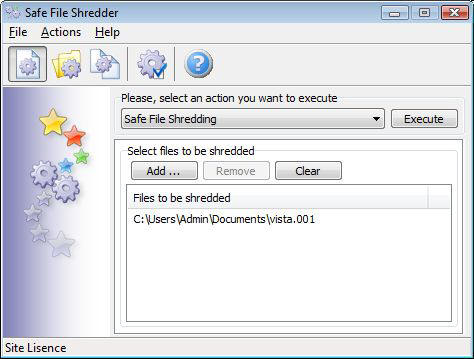
Iftaħ il-lista azzjonijiet u agħżel il-"Safe File tqattigħ" azzjoni.
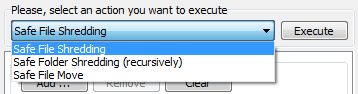
 Biex jattiva l-"Safe File tqattigħ" mode
inti tista 'wkoll agħfas il-buttuna menu ewwel.
Tagħżel fajls li jkun mqatta
Agħfas Żid Buttuna ... li tiftaħ il-dialog Windows standard.
Biex tagħżel fajl wieħed għandek tagħżel dan u agħfas il- Open buttuna.
Biex tagħżel fajls multipli għandek tagħmel dan li ġej:
Agħżel il-fajl ewwel tas-sekwenza, żomm il- Shift ewlenin u ikklikkja fuq il-fajl aħħar inti tixtieq li tagħżel. Jew inti tista 'żżomm l- Ctrl ewlenin u kontinwament kklikkja kull fajl inti tixtieq li jintgħażlu.
Wara li inti tista 'tagħfas il- Open buttuna u s-sett ta 'fajls se jkunu miżjuda mal-lista shredder. Ċara buttuna jippermettilek li tħassar il-lista tqattigħ, biss għall-istampa din il-buttuna jekk inti tixtieq li jitneħħew kompletament l-fajls kollha magħżula. Bil Neħħi buttuna inti tista 'tneħħi fajls waħda jew multipli mill-lista shredder. Biex tneħħi fajl waħdieni, tagħżel u agħfas il- Neħħi buttuna. Biex tneħħi sett ta 'fajls li inti għandek tagħżel fajls multipli u agħfas il- Neħħi buttuna.
Tesegwixxi l-tqattigħ fajls
Biex jingħata bidu għall-istampa tal-tqattiegħ Jesegwixxi buttuna. Il-proċess se jinbeda u l-indikatur progress se jintwerew.
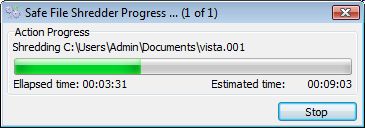
Nota: Il-fajls diġa 'proċessati huma mqatta dejjem !
Sabiex titwaqqaf l-operazzjoni tqattigħ, inti għandek agħfas il- Stop buttuna. Il-programm se jgħidlek biex tistenna l-aħħar ta 'l-operazzjoni kurrenti.
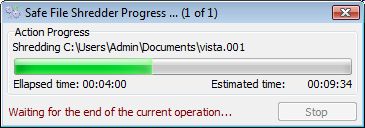
Meta l-operazzjoni kurrenti huwa lest, id-djalogu konferma se jintwerew.

Meta l-proċess imqatta huwa lest, inti se tikseb wieħed mill-messaġġi:
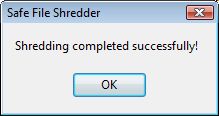
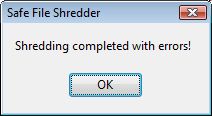
Operazzjoni kompluta b'suċċess operazzjoni kompluta bi żbalji
Fil-każ ta 'żbalji inti tkun kapaċi li tara l-iżbalji log. Inti tista 'tagħżel l-għażla biex tara messaġġi biss żball jew il-proċess kollu messaġġi fil-riżultat log tieqa. Żbalji huma mmarkati bil-kulur aħmar.
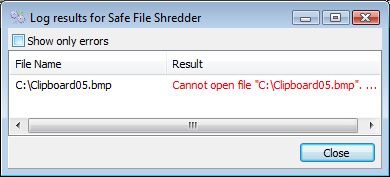
Xi wħud mill-iżbalji frekwenti:
ma tistax tiftaħ fajl (Il-fajl kienet imblukkata bl-applikazzjoni oħra u imqatta ma jistax jipproċessa dan.) Jekk jogħġbok qrib l-applikazzjoni li qed tuża dan il-fajl u erġa 'pprova.