
SmartFTP 접속 비밀 번호 복구
SmartFTP 고급 FTP 비밀 번호 복구 – 솔루션은 쉽게 SmartFTP의 FTP를 비밀 번호 복구.
어떻게 SmartFTP의 비밀 번호 복구를 만들기 위해?
어떻게 SmartFTP의 FTP 비밀 번호를 복구 (SmartSoft에 의해 주)?
SmartFTP의 FTP를 옵션
1. 실행 SmartFTP 클라이언트 소프트웨어
2. 비밀 번호를 선택하고 FTP 연결 복구 (예를 들어 ftp.microsoft.com)

3. 쓰기 현재의 호스트 이름과 포트 설정 아래로. 당신은 회복 후 그들을 복원해야합니다
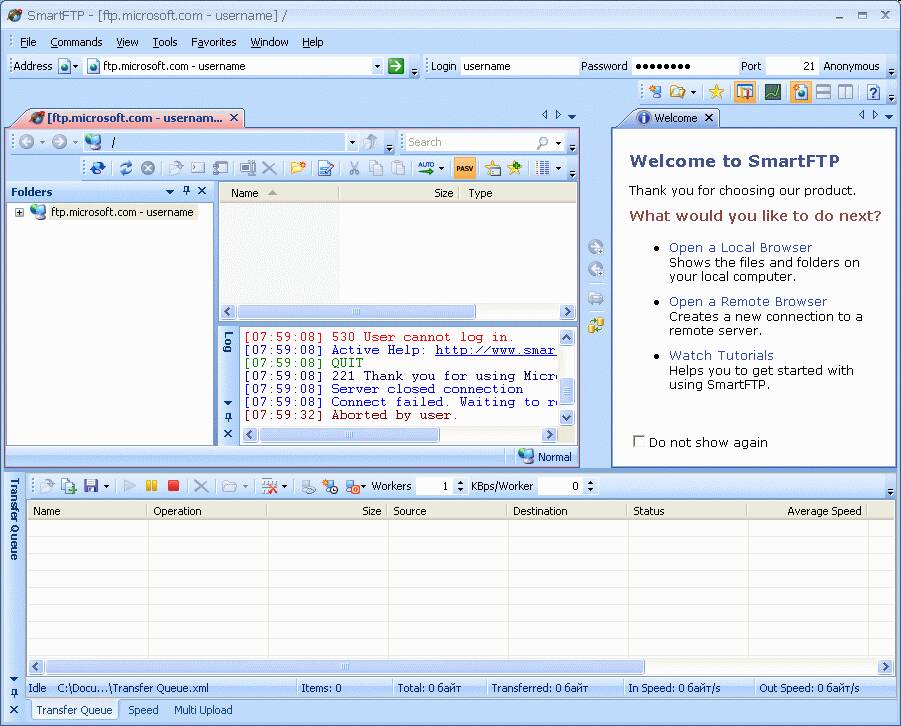
4. 주소 입력란에 localhost를 입력하세요. * 당신이 입력할 수도에 127.0.0.1 또는 컴퓨터의 현재 IP 주소는 고급 FTP를 비밀 번호 복구가 시작됩니다 어디로.

5. 고급 FTP를 비밀 번호 복구 도구를 실행하고 설정 탭에서에서 시작 버튼을 눌러 FTP 서버 에뮬레이션을 실행.
녹색 표시등은 서버 에뮬레이션 시작을 표시합니다.
* SmartFTP 포트 설정은 기본적하지 않은 경우이 경우에는 또한 포트 값을 변경해야합니다 (21)
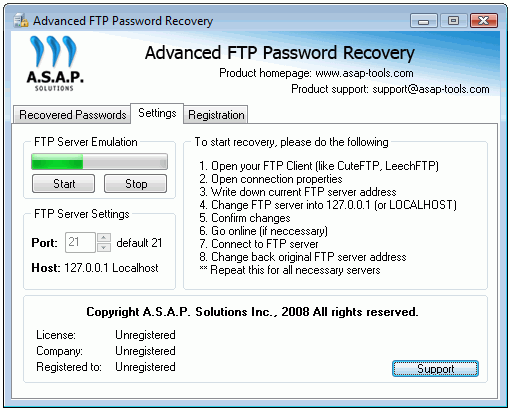
6. SmartFTP 도구로 이동하여 시작 단계에서 선택한 FTP 연결을 #2
그것을 수행하려면 – 당신은 GO 버튼을 눌러야합니다 
7. 연결 후 복구된 암호로 명명된 고급 FTP를 비밀 번호 복구 특별 탭에 표시 복구된 암호를 얻을 것이다:
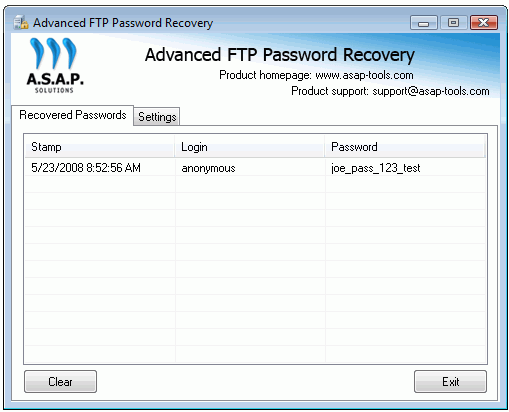
이제 당신은 복구된 암호를 적어하고 주소를 변경 (및 포트 해당되는 경우) 원래 값으로 (단계 참조 #4)